 NLJUG – Nederlandse Java User Group NLJUG – de Nederlandse Java User Group – is opgericht in 2003. De NLJUG verenigt software ontwikkelaars, architecten, ICT managers, studenten, new media developers en haar businesspartners met algemene interesse in alle aspecten van Java Technology.
Author: Mahendra Rao B
Original post on Foojay: Read More
Table of Contents
- Step 1: Add the Ai model and AgentCore memory dependencies
- Step 2: Create Short/Long Term in AWS Management Console
- Step 3: Add the following memory-related properties.
- Step 4: Add the below MemoryConfig class.
- Step 5: Create the ChatRequest and ChatResponse classes as shown below.
- Step 6: Add the below ShortTermController class.
- Step 7: verify
- End-to-End Flow
- References
If you’re joining us from Part 1 or need a quick refresher on the architecture, listen to this brief overview of how Spring AI and Amazon Bedrock work together.
In this article, we explore one of the AgentCore capabilities i.e., memory
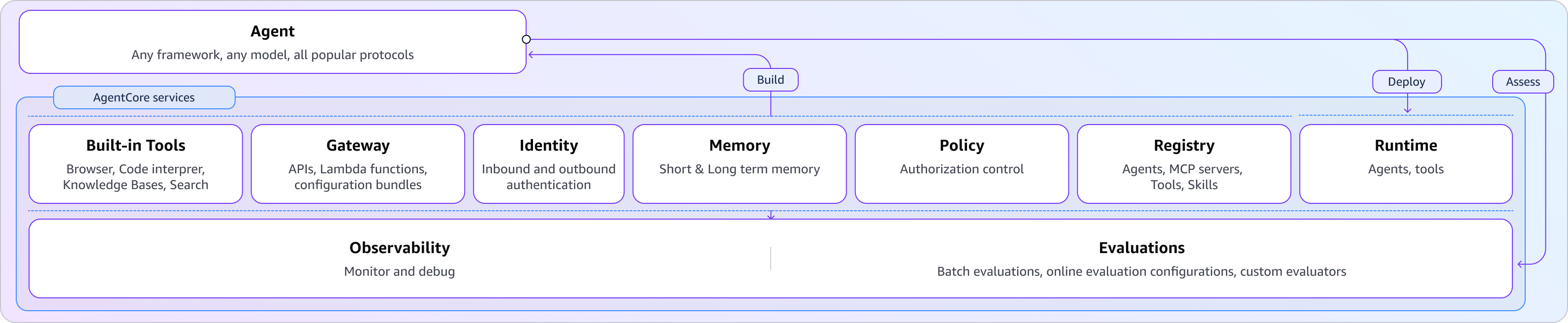
To begin, enable AgentCore memory for the agent you built earlier.
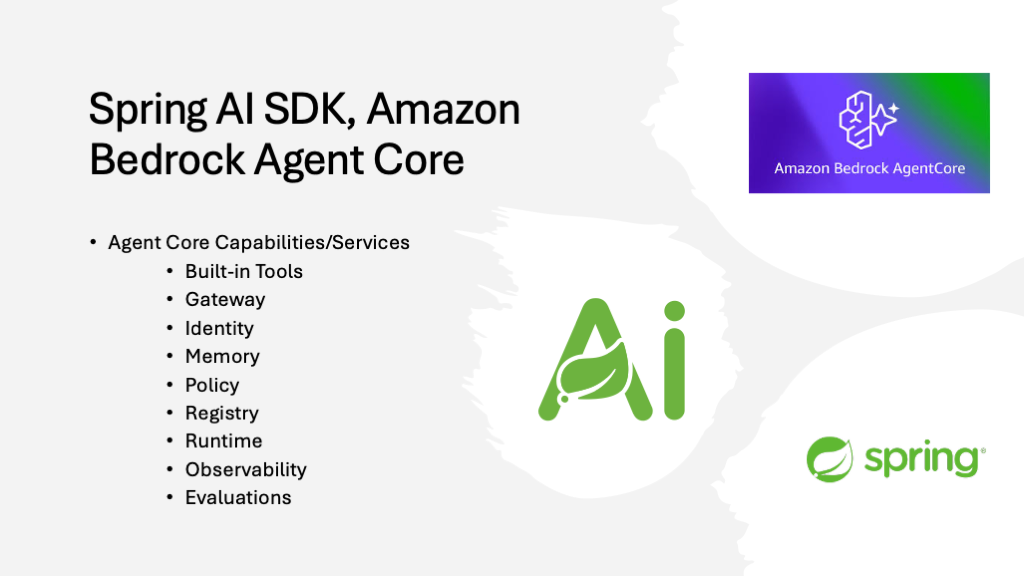
Step 1: Add the Ai model and AgentCore memory dependencies
<dependency>
    <groupId>org.springframework.ai</groupId>
    <artifactId>spring-ai-model</artifactId>
</dependency>
<dependency>
    <groupId>org.springaicommunity</groupId>
    <artifactId>spring-ai-agentcore-memory</artifactId>
</dependency>
Step 2: Create Short/Long Term in AWS Management Console
Navigate to Amazon Bedrock AgentCore > Memory to create short/long-term memories.
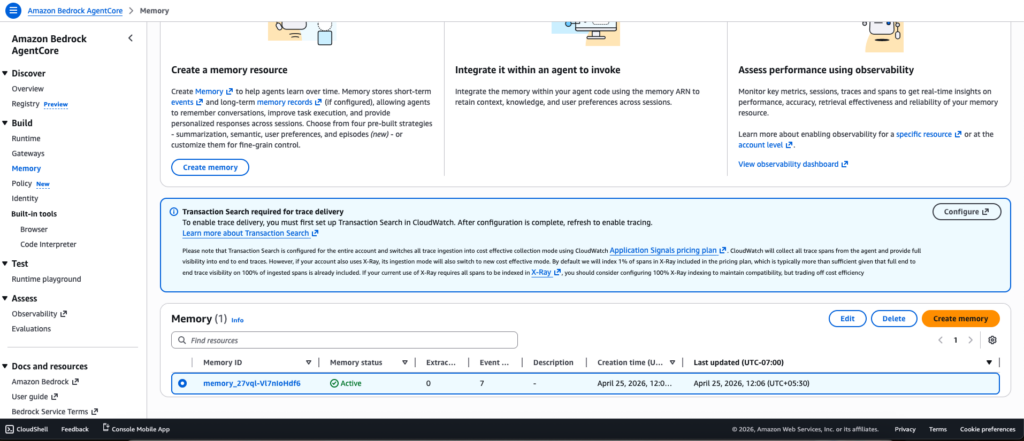
Step 3: Add the following memory-related properties.
application.yml
agentcore:
  memory:
    memory_id: memory_27vql-Vl7nIoHdf6
    total-events-limit: 100
    default-session: default
    page-size: 50
    ignore-unknown-roles: false
application.properties
agentcore.memory.memory_id=memory_27vql-Vl7nIoHdf6
agentcore.memory.total-events-limit=100
agentcore.memory.default-session=default
agentcore.memory.page-size=50
agentcore.memory.ignore-unknown-roles=false
Step 4: Add the below MemoryConfig class.
package com.bsmlabs.springai.config;

import org.springaicommunity.agentcore.memory.longterm.AgentCoreMemory;
import org.springframework.ai.chat.client.advisor.MessageChatMemoryAdvisor;
import org.springframework.ai.chat.memory.ChatMemory;
import org.springframework.ai.chat.memory.MessageWindowChatMemory;
import org.springframework.context.annotation.Bean;
import org.springframework.context.annotation.Configuration;

import java.util.List;

@Configuration
public class MemoryConfig {

    @Bean
    public ChatMemory chatMemory() {
        return MessageWindowChatMemory.builder()
                .maxMessages(20) // keeps last 20 messages
                .build();
    }

    @Bean
    public MessageChatMemoryAdvisor messageChatMemoryAdvisor(ChatMemory chatMemory) {
        return MessageChatMemoryAdvisor.builder(chatMemory).build();
    }

    @Bean
    public AgentCoreMemory agentCoreMemory(MessageChatMemoryAdvisor advisor) {
        return new AgentCoreMemory(advisor, List.of());
    }

}
Let’s break down the structure of the beans defined in the above configuration class.
4.1. ChatMemory Bean – The Core
@Bean
public ChatMemory chatMemory() {
   return MessageWindowChatMemory.builder()
                .maxMessages(20) // keeps last 20 messages
                .build();
}
This creates a sliding window memory that retains only the last 20 messages. Benefits include:
- Prevents unbounded memory growth
- Keeps recent context while discarding older, irrelevant messages
- Reduces token usage when calling LLMs, making it cost-effective
- Maintains conversation relevance
4.2. MessageChatMemoryAdvisor – The Wrapper
@Bean
public MessageChatMemoryAdvisor messageChatMemoryAdvisor(ChatMemory chatMemory) {
   return MessageChatMemoryAdvisor.builder(chatMemory).build();
}
This advisor acts as an intermediary that:
- Integrates the ChatMemory into Spring AI’s advisor chain
- Automatically injects conversation history into chat requests
- Manages when and how memory is applied to prompts
4.3. AgentCoreMemory – The Orchestrator
@Bean
public AgentCoreMemory agentCoreMemory(MessageChatMemoryAdvisor advisor) {
   return new AgentCoreMemory(advisor, List.of());
}
This combines the advisor with an empty list of additional strategies. It:
- Coordinates memory across agent operations
- Provides a unified interface for long-term memory management
- Allows for extensibility (the List.of() can include custom memory strategies)
Step 5: Create the ChatRequest and ChatResponse classes as shown below.
Add the following classes to the models folder. We will use them in the next REST controller.
package com.bsmlabs.springai.models;

public record ChatRequest(String message) {
}
package com.bsmlabs.springai.models;

public record ChatResponse(String response) {
}
Step 6: Add the below ShortTermController class.
Adding memory to an existing agent helps improve response latency and relevance. The agent can store previous conversations in short-term memory (STM). It can also retain learned information over time using long-term memory (LTM).
The SDK integrates with AgentCore Memory through Spring AI’s advisor pattern. These advisors act as interceptors that enrich prompts with relevant context before sending them to the model.
The below RestController demonstrates how to build a stateful chat API that maintains conversation history by leveraging the memory configuration from the previous example to provide a persistent conversational context.
package com.bsmlabs.springai.agents;

import com.bsmlabs.springai.models.ChatRequest;
import com.bsmlabs.springai.models.ChatResponse;
import org.springaicommunity.agentcore.memory.longterm.AgentCoreMemory;
import org.springaicommunity.agentcore.memory.shorttem.AgentCoreShortTermMemoryRepository;
import org.springframework.ai.chat.client.ChatClient;
import org.springframework.ai.chat.memory.ChatMemory;
import org.springframework.ai.chat.messages.Message;
import org.springframework.web.bind.annotation.*;

import java.util.List;

@RestController
public class ShortTermMemoryController {

    private final ChatClient chatClient;
    private final ChatMemory chatMemory;
    private final AgentCoreMemory agentCoreMemory;

    private static final String CONVERSATION_ID = UUID.randomUUID().toString();

    public ShortTermMemoryController(ChatClient.Builder chatClientBuilder,
                                     ChatMemory chatMemory,
                                     AgentCoreMemory agentCoreMemory,
                                     AgentCoreShortTermMemoryRepository shortTermMemoryRepository) {
        this.chatClient = chatClientBuilder.build();
        this.chatMemory = chatMemory;
        this.agentCoreMemory = agentCoreMemory;

        // shortTermMemoryRepository.deleteByConversationId(CONVERSATION_ID);
    }

    @PostMapping("/api/short")
    public ChatResponse shortTermChat(@RequestBody ChatRequest chatRequest) {
        String response = chatClient.prompt()
                .user(chatRequest.message())
                .advisors(agentCoreMemory.advisors)
                .advisors(a -> a.param(ChatMemory.CONVERSATION_ID, CONVERSATION_ID))
                .call()
                .content();

        return new ChatResponse(response);
    }


    @GetMapping("/api/history")
    public List<Message> getHistory() {
        return chatMemory.get(CONVERSATION_ID);
    }

    @DeleteMapping("/api/history")
    public void clearHistory() {
        chatMemory.clear(CONVERSATION_ID);
    }

}
- ChatClient: Send prompts to the LLM
- ChatMemory: Manages the conversation window/sliding window (20 messages)
- AgentCoreMemory: Orchestrates memory across operations
POST /api/short – Chat Endpoint
@PostMapping("/api/short")
public ChatResponse shortTermChat(@RequestBody ChatRequest chatRequest) {
   String response = chatClient.prompt()
                .user(chatRequest.message())
                .advisors(agentCoreMemory.advisors)
                .advisors(a -> a.param(ChatMemory.CONVERSATION_ID, CONVERSATION_ID))
                .call()
                .content();

   return new ChatResponse(response);
}
What happens:
- Receives user message in ChatRequest
- Calls agentCoreMemory.advisors to inject the MessageChatMemoryAdvisor
- Passes CONVERSATION_ID to the advisor so it knows which conversation’s history to retrieve
- ChatClient automatically
- Retrieves last 20 messages for this conversation
- Appends them to the current user message
- Sends the full context to the LLM
- Stores the user message + response in ChatMemory
- Returns just the LLM response to the client
GET /api/history – Retrieve Conversation History
@GetMapping("/api/history")
public List<Message> getHistory() {
   return chatMemory.get(CONVERSATION_ID);
}
This method returns all messages (up to 20) for the given conversation ID. It is useful for:
- Displaying chat history in the UI
- Debugging the conversation context
- Auditing interactions
DELETE /api/history – Clear History
@DeleteMapping("/api/history")
public void clearHistory() {
   chatMemory.clear(CONVERSATION_ID);
}
Step 7: verify
### Tell name - STM
POST http://localhost:8080/api/short
Content-Type: application/json

{
  "message": "Mahendra is writing an article to Foojay on Spring AI SDK with Amazon Bedrock Agentcore"
}

### Ask name - STM
POST http://localhost:8080/api/short
Content-Type: application/json

{
  "message": "What is my name?"
}

### Get history
GET http://localhost:8080/api/history

### Clear history
DELETE http://localhost:8080/api/history
Using curl commands
# --- Short-Term Memory (STM) ---
# Tell your name and what you're talking about
curl -X POST http://localhost:8080/api/short
    -H "Content-Type: application/json"
    -d '{"message": "Mahendra is writing an article to Foojay on Spring AI SDK with Amazon Bedrock Agentcore"}'

# Ask for your name (memory recall)
curl -X POST http://localhost:8080/api/short
    -H "Content-Type: application/json"
    -d '{"message": "What is my name?"}'

# Get conversation history
curl http://localhost:8080/api/history

# Clear conversation
curl -X DELETE http://localhost:8080/api/history
End-to-End Flow
User Request
    ↓
[/api/short endpoint]
    ↓
ChatMemory retrieves last 20 messages for CONVERSATION_ID
    ↓
Messages + current user input sent to LLM
    ↓
LLM generates response
    ↓
Exchange stored in ChatMemory (sliding window)
    ↓
Response returned to user
In the next part, I will discuss the inclusion of the remaining AgentCore services adding built-in tools like browser, code interpreter, and deployment to Amazon Bedrock AgentCore runtime.
Everything comes from the companion repo, which contains fully working implementations of each example.
Happy Learning Spring AI
References
- https://spring.io/ai
- Amazon Bedrock AgentCore: https://docs.aws.amazon.com/bedrock-agentcore/latest/devguide/what-is-bedrock-agentcore.html
- Spring AI: https://spring.io/projects/spring-ai
- AWS Blog Spring AI SDK: https://aws.amazon.com/blogs/machine-learning/spring-ai-sdk-for-amazon-bedrock-agentcore-is-now-generally-available/
The post Explore Spring AI SDK – Amazon Bedrock AgentCore – Part 2 appeared first on foojay.