 NLJUG – Nederlandse Java User Group NLJUG – de Nederlandse Java User Group – is opgericht in 2003. De NLJUG verenigt software ontwikkelaars, architecten, ICT managers, studenten, new media developers en haar businesspartners met algemene interesse in alle aspecten van Java Technology.
Author: Graeme Robinson
Original post on Foojay: Read More
And why MongoDB might be a better relational database than you ever realized.

Design reviews are one-on-one meetings where MongoDB experts deliver advice on data modeling best practices and application design challenges. In this series, we are going to explore common real-life scenarios where design reviews helped developers achieve meaningful success with MongoDB.
This article was written by Graeme Robinson. Find him on LinkedIn.
In Part 1 of this series, we described a use case based on a recent design review I conducted with a team at a MongoDB customer. The team in question was new to MongoDB, and the approach they had taken to both modeling their data and then subsequently querying it was very “RDBMS-like.” As a result, query performance was significantly slower than their SLA called for.
In this second part of the series, we’ll discuss the first of four changes we made in the process of improving the query performance.
The video streaming service use case: profiles, devices, and device types (a recap)
Based on the use case presented by the customer team during their design review, the scenario we introduced in Part 1 was for a fictional video streaming service. The specific part of the application we were focussing on mapped user profiles to the devices from which those users streamed the service.
This was a classic many-to-many relationship: Each user profile was associated with one or more devices and each device associated with one or more profiles. Each device was categorized by device model name, e.g., “iPhone 12,” “Samsung TV,” “Apple TV,” etc.
The many-to-many relationship between profiles and devices was being modeled using an intermediate, or “associative,” mapping collection using the classic RDBMS approach:
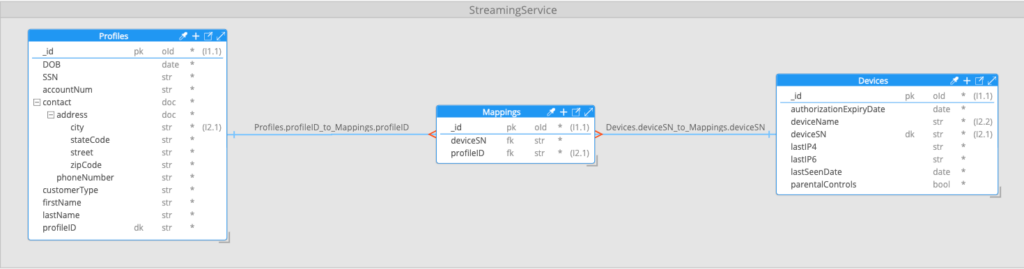
To test the data model and query designs, we had built out a test system in MongoDB Atlas with one million profile documents, 3.4 million device documents, and over five million mapping documents representing links between profiles and devices.
Using this data model, the query that we were attempting to support was to find all profiles associated with a contact address in a given city, and that had used a given device type to access the service—for example, all profiles registered in Austin, TX, which had accessed the service using an iPhone 12. The query was required to return matching profiles with an embedded list of each matching device, in pages of 10 profiles ordered by profileID.
To perform this query, an aggregation pipeline had been built with 10 stages:

In Part 1 of this series, we broke down what each stage of the pipeline was designed to do. If you are unfamiliar or need a refresher on MongoDB aggregation pipelines, I’d suggest you refer back to that before continuing.
With this design, a test run of 300 iterations of the query pipeline split up and executed by 15 concurrent threads gave the following results:
| Pipeline Description | Average time per query | Total elapsed time (300 query iterations, 15 concurrent threads) |
| Initial design | 11.8 seconds | 260 seconds |
With a target query response time of one second or less, this was obviously problematic.
Optimization, Step 1: removing the $unwind stages
The initial pipeline design included two $unwind stages. $unwind stages are used to flatten arrays in MongoDB documents, usually so that the data can be reorganized or grouped by a different field.
$unwind stages are often used after $lookup stages (MongoDB’s equivalent of a SQL join), but, as was the situation in this case, this is sometimes due to a misunderstanding of how arrays can be handled in aggregation pipelines, and can lead to slower than necessary performance.
To understand why this is, remember that performing a join with $lookup adds each joined document to an array within the parent document. Running a subsequent $unwind stage on those arrays results in a separate document being created for each element in the array, with the parent document fields duplicated in each resulting document.
As an example, after running the $lookup stage to join a profile document with corresponding documents in the mapping collection, the resulting document might look like this (note the two entries in the mappingData array):
{
  "_id": {...},
  "DOB": "1987-06-17T00:00:00Z",
  "SSN": "592-55-1484",
  "accountNum": "VMV4AMDTCZ",
  "contact": {...},
  "customerType": "S",
  "firstName": "Jack",
  "lastName": "Snyder",
  "profileID": "VMV4AMDTCZ-1",
  "mappingData": [
    {
      "_id": {"$oid": "6781d3db41099532d4242e63"},
      "deviceSN": "97670d46-5235-4a2c-90c7-10f47273606f",
      "profileID": "VMV4AMDTCZ-1"
    },
    {
      "_id": {"$oid": "6781d3db41099532d4242e64"},
      "deviceSN": "b2f255ea-6951-4ed5-bd6f-052dc2ac9880",
      "profileID": "VMV4AMDTCZ-1"
    }
  ]
}
After running a subsequent $unwind stage on the mappingData field, the example document above would be transformed into two separate output documents: one for each element in the mappingData array:
{
  "_id": {...},
  "DOB": "1987-06-17T00:00:00Z",
  "SSN": "592-55-1484",
  "accountNum": "VMV4AMDTCZ",
  "contact": {...},
  "customerType": "S",
  "firstName": "Jack",
  "lastName": "Snyder",
  "profileID": "VMV4AMDTCZ-1",
  "mappingData": {
    "_id": {"$oid": "6781d3db41099532d4242e63"},
    "deviceSN": "97670d46-5235-4a2c-90c7-10f47273606f",
    "profileID": "VMV4AMDTCZ-1"
  }
}

{
  "_id": {...},
  "DOB": "1987-06-17T00:00:00Z",
  "SSN": "592-55-1484",
  "accountNum": "VMV4AMDTCZ",
  "contact": {...},
  "customerType": "S",
  "firstName": "Jack",
  "lastName": "Snyder",
  "profileID": "VMV4AMDTCZ-1",
  "mappingData": {
    "_id": {"$oid": "6781d3db41099532d4242e64"},
    "deviceSN": "b2f255ea-6951-4ed5-bd6f-052dc2ac9880",
    "profileID": "VMV4AMDTCZ-1"
  }
}
The customer team had included this $unwind stage to ensure the subsequent $lookup stage, joining to devices on the value of mappingData.deviceSN, was carried out for each matched mapping. As this data was originally contained within elements of an array, they believed it was necessary to first unwind the array to ensure the $lookup was performed for each element.
As a reminder, the format of the second $lookup stage to join to the devices collection was this:
  {
    $lookup: {
      from: "Devices",
      localField: "mappingData.deviceSN",
      foreignField: "deviceSN",
      pipeline: [
        {
          $match: {
            deviceName: "iPhone 12"
          }
        },
        {
          $set: {
            _id: "$$REMOVE"
          }
        }
      ],
      as: "deviceData"
    }
  }
The key element here is the localField value, and there is an important aspect the customer team was unaware of: If the field pointed to by localField is a field within elements of an array, the $lookup will automatically be run for the corresponding value of each element of the array. This meant the proceeding $unwind was unnecessary.
As well as being handy syntactic sugar, being able to eliminate the first $unwind stage had another important benefit: In our test system, an initial search for profiles listing “Austin” in their city field returned 6,763 documents. After joining these with their corresponding mapping documents, they totaled 8.73MB of data. Following the $unwind of the mappingData array, this jumped to 34,182 documents and 28.92MB of data. (Remember, all of the fields from the parent profile documents would be duplicated for each “unwound” mapping).
This significant increase in the number of documents and the amount of memory required to process them had a performance impact on each subsequent stage in the pipeline. By eliminating the first $unwind stage, we were able to avoid incurring this cost.
The second $unwind stage in the original pipeline was being used to filter out profiles who had no associated devices of the target type. Where this was the case, the second $lookup—from the mapping data to the devices collection—would have resulted in an empty deviceData array being created:
{
  "_id": {...},
  "DOB": "1987-06-17T00:00:00Z",
  "SSN": "592-55-1484",
  "accountNum": "VMV4AMDTCZ",
  "contact": {...},
  "customerType": "S",
  "firstName": "Jack",
  "lastName": "Snyder",
  "profileID": "VMV4AMDTCZ-1",
  "mappingData": [...],
  "deviceData": []
}
When an $unwind stage is carried out on an empty array, the default behavior is for the parent document to be removed from the result set. Although this was working as logically intended, the same outcome could be achieved with a simple $match operation that was easier to understand:
{
  $match: {
    deviceData: {
      $ne: []
    }
  }
}
With these changes in place, the complete pipeline now looked as follows:
[
  {
    $match: {
      "contact.address.city": "Austin"
    }
  },
  {
    $lookup: {
      from: "Mappings",
      localField: "profileID",
      foreignField: "profileID",
      as: "mappingData"
    }
  },
  {
    $lookup: {
      from: "Devices",
      localField: "mappingData.deviceSN",
      foreignField: "deviceSN",
      pipeline: [
        {
          $match: {
            deviceName: "iPhone 12"
          }
        },
        {
          $set: {
            _id: "$$REMOVE"
          }
        }
      ],
      as: "deviceData"
    }
  },
  {
    $set: {
      accountNum: "$$REMOVE",
      mappingData: "$$REMOVE",
      customerType: "$$REMOVE",
      DOB: "$$REMOVE",
      _id: "$$REMOVE"
    }
  },
  {
    $match: {
      deviceData: {
        $ne: []
      }
    }
  },
  {
    $sort: {
      profileID: 1
    }
  },
  {
    $skip: 0
  },
  {
    $limit: 10
  }
]
One final thing to note in the refactored pipeline was that because we were no longer using any $unwind stages, there was no need for the subsequent $group stage to regroup the documents by the original profileID, and so it too had been removed from the pipeline. In fact, any time you see a MongoDB pipeline which includes an $unwind stage followed by a $group stage that regroups the documents by the original ID, you should be wary. There’s usually a more efficient way to do the same operation—often with a $set stage that uses the $map, $reduce, or $filter operators to manipulate the array entries as needed. In our case, without the $unwind stages, all that was needed was a $set stage to remove unwanted fields (a $project stage would also have worked here):
{
  $set: {
    accountNum: "$$REMOVE",
    mappingData: "$$REMOVE",
    customerType: "$$REMOVE",
    DOB: "$$REMOVE",
    _id: "$$REMOVE"
  }
}
With these changes in place, retesting the performance of the pipeline showed a 60% improvement in both the performance of individual queries and the total time to complete 300 query iterations.
| Pipeline Description | Average time per query | Total elapsed time (300 query iterations, 15 concurrent threads) |
| Initial Design | 11.8 seconds | 260 seconds |
| $unwind Removed | 4.7 seconds | 105 seconds |
This was a great start, but still well short of the target one-second query response time.
The post Aggregation Optimization in MongoDB: Unnecessary Unwinds (Part 2) appeared first on foojay.